Blog
AI schema — what structured data can and cannot do
Mike Holp · Published · Updated · Reviewed · 4 min read
There is no special “AI schema” vocabulary. The useful implementation is ordinary Schema.org markup that accurately describes visible page content. It can help parsers identify an organization, person, article, product, or breadcrumb, but passing a validator does not guarantee a search feature or generated-answer citation.
Short answer: Add the most specific relevant Schema.org types for facts already visible on the page, keep stable entity IDs and URLs, and validate both vocabulary and Google feature eligibility. Treat markup as clarity and eligibility work, not a direct AI-ranking lever.
What structured data can do
- identify the main entity and its canonical URL;
- connect an article to its author and publisher;
- expose dates, breadcrumbs, products, offers, or local-business facts in a consistent graph;
- make mismatches between templates and visible content easier to detect;
- enable eligibility for supported Google rich-result features when all guidelines are met.
Google says valid structured data does not guarantee a rich result. Its guidance for AI Overviews and AI Mode also says no special schema is required. See Google's structured-data policies and AI features guidance.
What structured data cannot do
- force ChatGPT, Claude, Gemini, Perplexity, or Google to cite a page;
- replace visible content or independent evidence;
- make an unsupported review, price, location, or author claim true;
- repair a blocked, non-indexable, redirected, or empty page;
- prove that a later visibility change was caused by the markup.
A worked invalid-to-valid example
This graph uses a made-up property and omits the canonical identity:
{
  "@context": "https://schema.org",
  "@type": "Organization",
  "name": "Example Heating",
  "aiVisibilityServiceArea": "Bristol"
}
Use defined Schema.org properties and match visible facts:
{
  "@context": "https://schema.org",
  "@type": "HVACBusiness",
  "@id": "https://example.com/#business",
  "name": "Example Heating",
  "url": "https://example.com/",
  "areaServed": {
    "@type": "City",
    "name": "Bristol"
  }
}
The second example is valid only if the page visibly identifies the same real business and service area. Do not copy the type or location to an unrelated company.
Validate structured data without overclaiming it
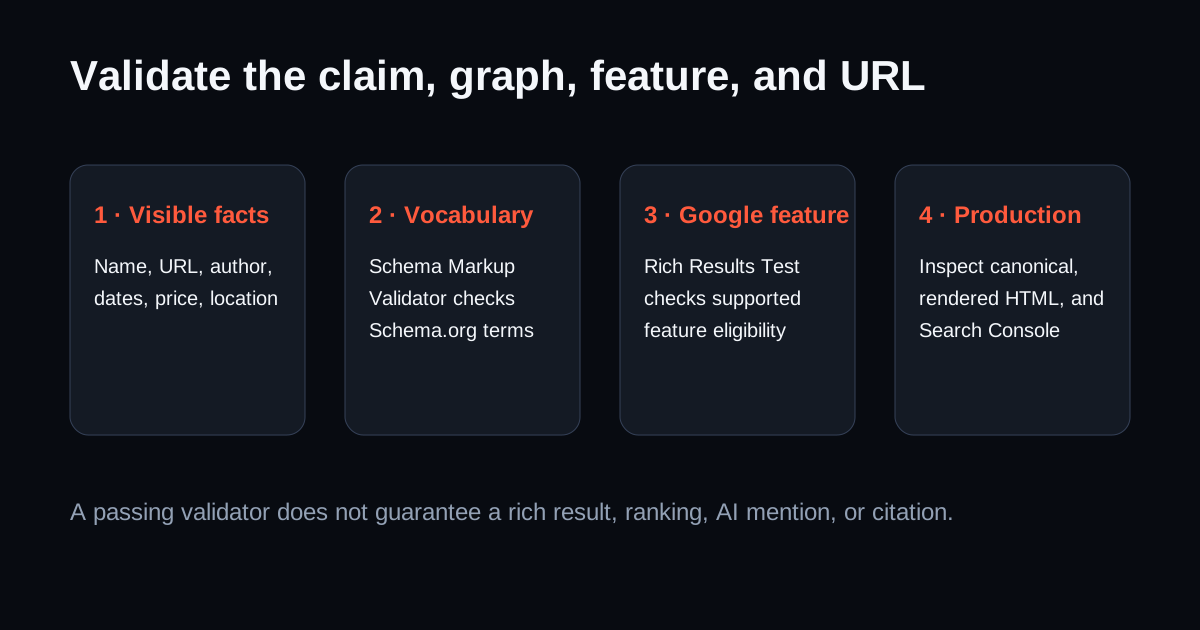
- Compare with visible text. Verify every name, URL, date, price, author, and service area.
- Run Schema Markup Validator. Check general vocabulary and syntax.
- Run Rich Results Test. Check eligibility only for Google-supported features.
- Test the deployed URL. Confirm the canonical page is accessible and the rendered HTML contains the graph.
- Inspect Search Console. Monitor the canonical and applicable improvement reports.
- Measure generated answers separately. A schema pass is not an AI visibility result.
Use the free VisiScan schema checker for the first pass, then follow the Rich Results Test vs Schema Markup Validator workflow.
Which types fit common pages?
| Visible page | Possible type | Required editorial check |
|---|---|---|
| Company home/about | Organization or a specific subtype | Name, canonical URL, contact, official profiles |
| Local service page | Applicable LocalBusiness subtype | Real location/service area and contact details |
| Editorial article | Article or BlogPosting | Headline, author, publisher, dates, image |
| Product and current offer | Product with Offer where applicable | Price, currency, availability, seller, visible parity |
| Site hierarchy | BreadcrumbList | Every item resolves to the represented path |
| Original downloadable data | Dataset | Creator, description, distribution, temporal coverage, license |
FAQPage may describe visible questions and answers, but Google retired its FAQ rich result in 2026. Do not add FAQs solely for markup.
FAQ
Does schema improve AI visibility?
It can make visible facts more explicit to parsers, which is useful regardless of a direct ranking effect. There is no guarantee that adding markup increases AI mentions or citations; measure those outcomes separately.
Is JSON-LD better than visible HTML?
They serve different roles. Users and crawlers need the visible content. JSON-LD can describe that content in a machine-readable graph but must not contradict or replace it.
Which validator should I use?
Use Schema Markup Validator for broad Schema.org conformance and Rich Results Test for supported Google search features. Test the live canonical URL after deployment.
Sources
Check technical readiness
Related reading
Keep going
Turn the ideas in this article into a measurable baseline for your own site.